For iPhonePhotos, barcodes, labels
Every plate, scored.
Photograph what you eat. It is on your day before you put the phone down, with a score from 0 to 10 for protein, fibre, sugar and salt, the reason behind it, and what would help at the next meal.

Barcodes, the food database, your day, scores, weight, workouts and water are free. Reading a photograph is what the subscription buys. Nothing needs an account.
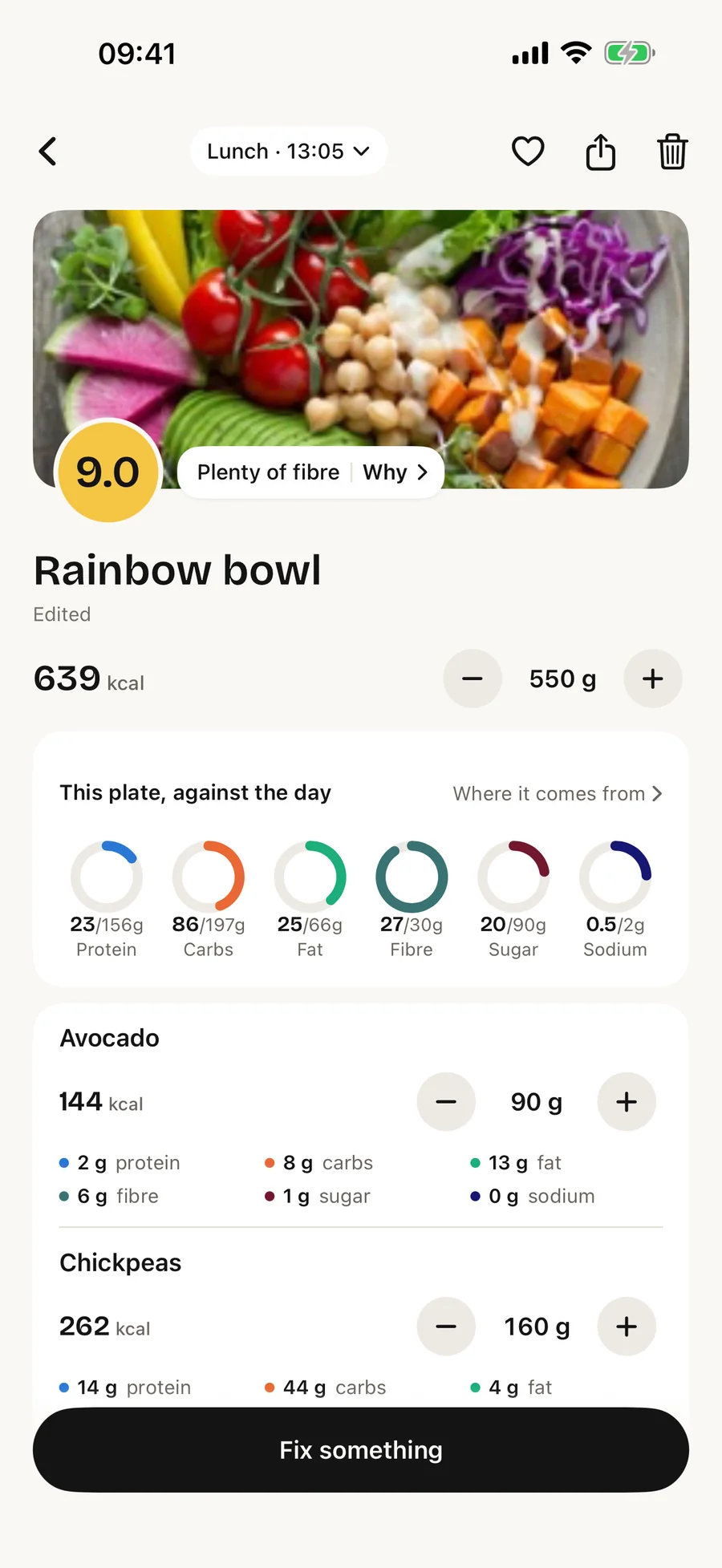

- Logged the moment you shoot. Nothing to confirm. The reading catches up in a few seconds and the row fills in.
- Scored on your phone, by our own code. The model reads the picture; it does not hand out the grade. The same plate scores the same tomorrow.
- Photographs are read and forgotten. Google's AI reads each one after you have agreed to it, and our server writes it nowhere. The only copy that lasts is on your phone.
How it works
Three taps, and one of them does the thinking.
Photograph the plate
One shot, from above. The meal is on your day at once, before the reading finishes, so there is nothing to sit and wait for.
Read the score
0 to 10, judged for a plate this size against your own targets. 8 and up is a great plate. Under 6 means one thing is off, and the card names it.
Fix it in words
Half the rice. Cooked in butter. It’s tofu, not chicken. Say so in a sentence and every number on the card follows.
The day
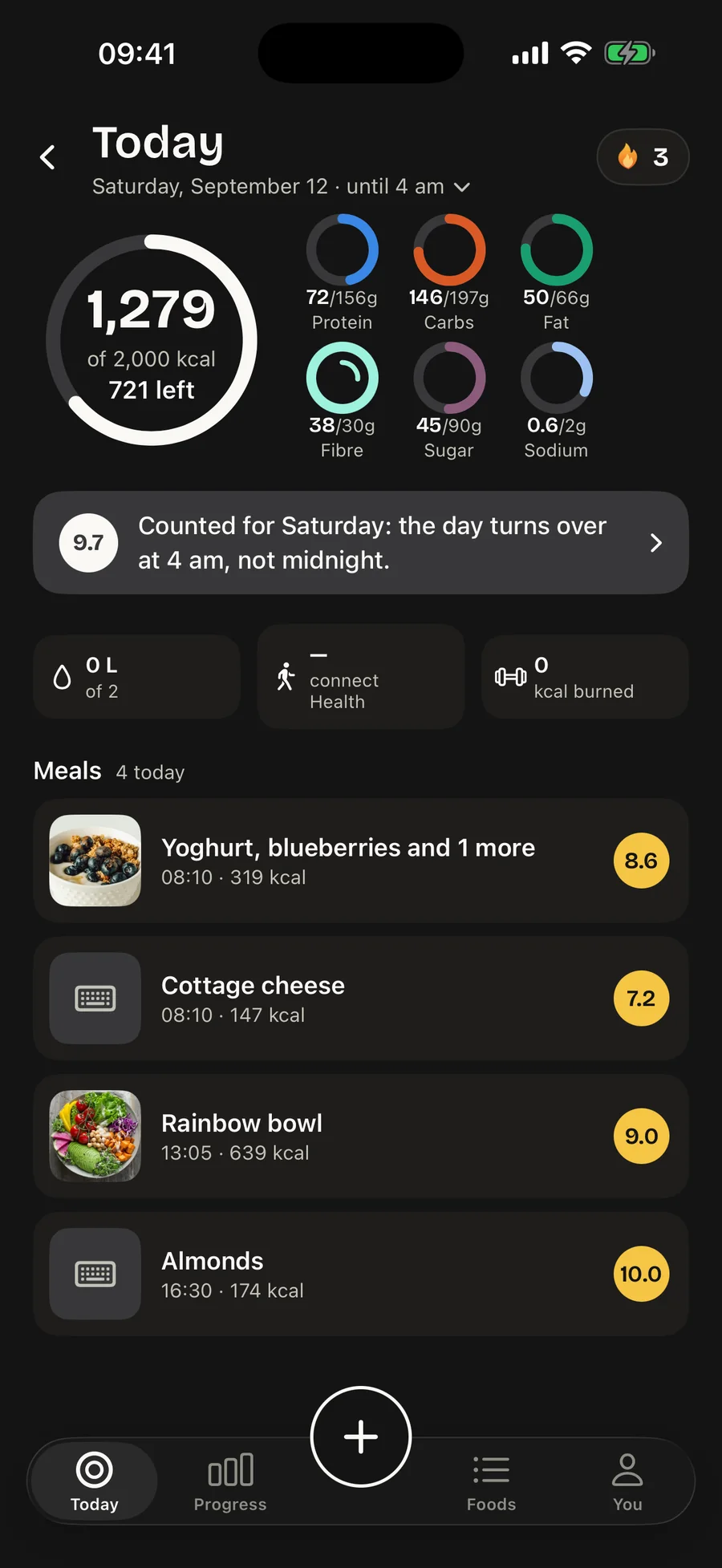
One ring for calories. Six for what they are made of.
The grey track is what the day needs, the ink is what you have eaten. Around it, six small rings say where those calories came from. Colour means a nutrient, and nothing else on the screen is coloured.
- Protein72/156 g
- Carbs146/197 g
- Fat50/66 g
- Fibre38/30 g
- Sugar45/90 g
- Sodium0.6/2 g
Protein, carbs, fat and fibre fill towards a target. Sugar and sodium fill towards a ceiling and turn orange past it. Under the rings, one sentence about the next meal, never a lecture about the last one.
Meals sit in a flat list by time, each with its score. There are no slots to fill and no badges to earn. The day turns over at 4 am rather than midnight, so a late dinner lands where it belongs, and a streak counts days with a plate logged, not perfect days.
The score
A number with the reason attached.
Every plate gets a score from 0 to 10. It is not about calories: it looks at protein, fibre, sugar and salt against what your day needs, and the more of the plate is plants, the more of its sugar it forgives. Tap the number and each part is explained for a plate this size.
The score is computed on your phone, deterministically, from named components. Nothing is graded by a model, so nothing shifts from one day to the next without a reason you can read.
Why 9.0 · Rainbow bowl
9.0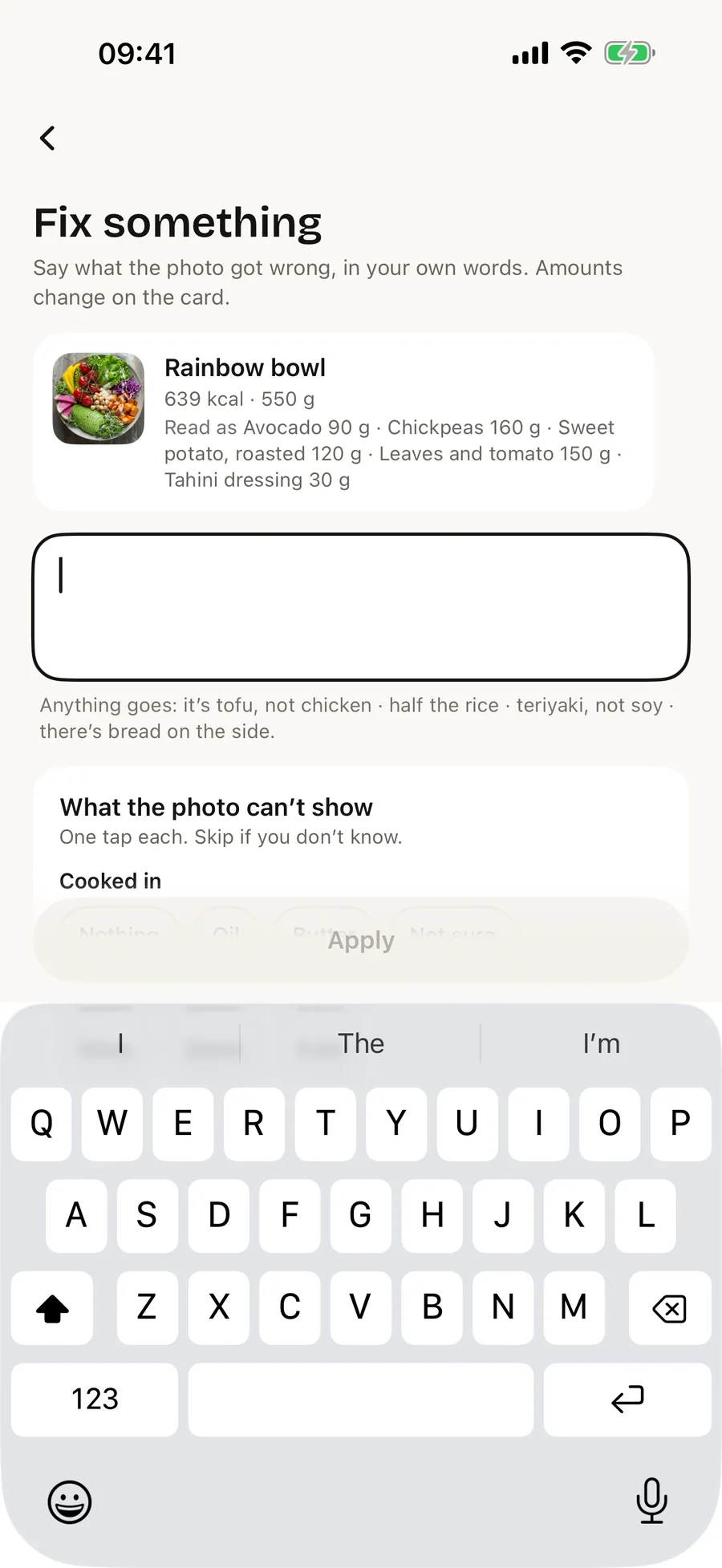
Fix something
Say what the photo could not show.
A picture cannot tell what is under the leaves, what the dressing was, or that it is tofu rather than chicken. So the card takes plain words: “half the rice · teriyaki, not soy · there’s bread on the side”. The amounts change, the score follows, and the meal stays yours.
For the quick cases there is no typing at all. − and + under the name scale the whole plate, every food together. On one food they change just that one. A wrong food is swiped off the list.
Progress
The week, explained in three lines.
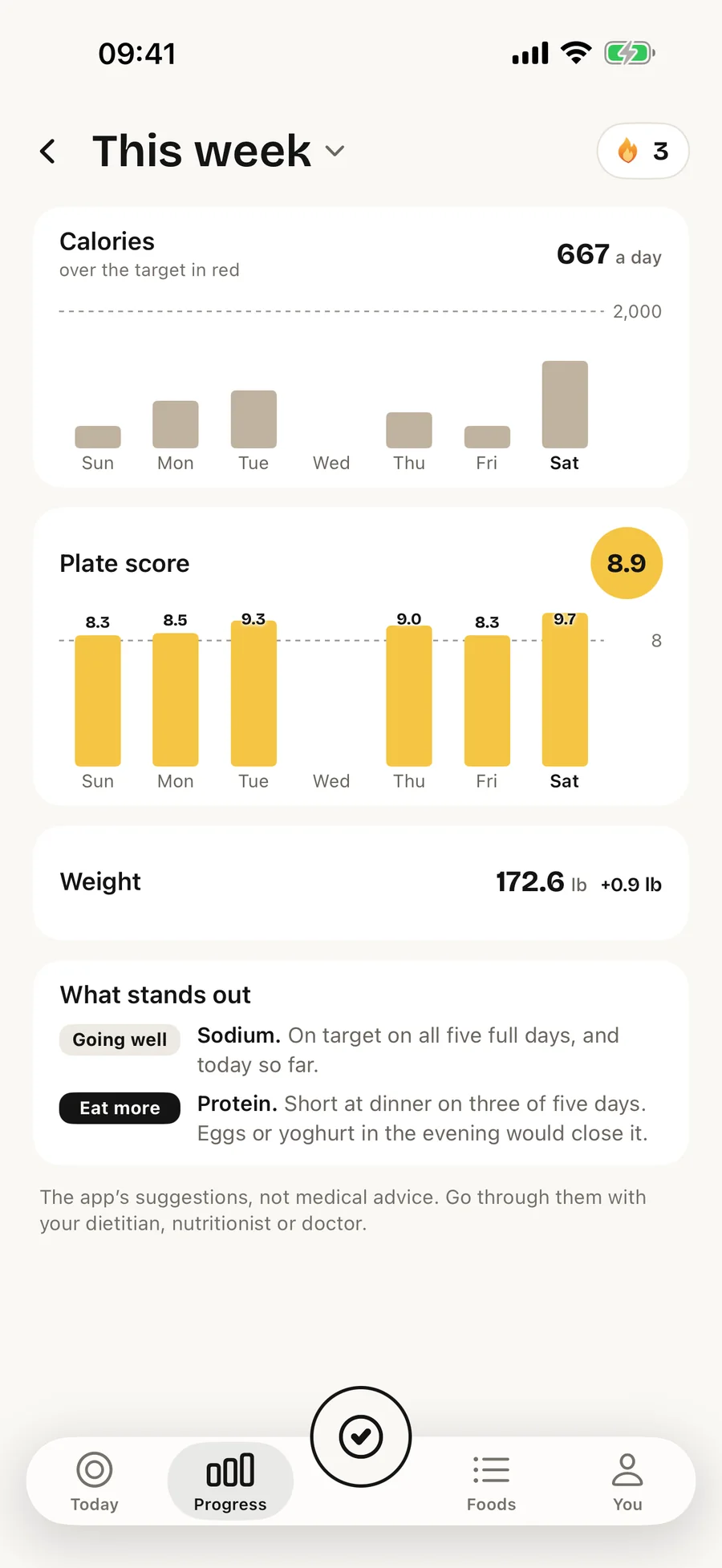
Calories, plate score and weight over the week, the month, the year, or any rolling range. Under the charts, what stands out: which nutrient, on how many days, at which meal. It comes from your own days, never from a template.
- Going wellProtein. On target 5 of 7 days.
- Eat moreFibre. Short on 4 of 7 days, mostly at lunch. Vegetables at midday would close it.
Weight is a trend, not a number. Daily readings are mostly water, so the line is drawn through them, and the week shows only the last reading and the change.
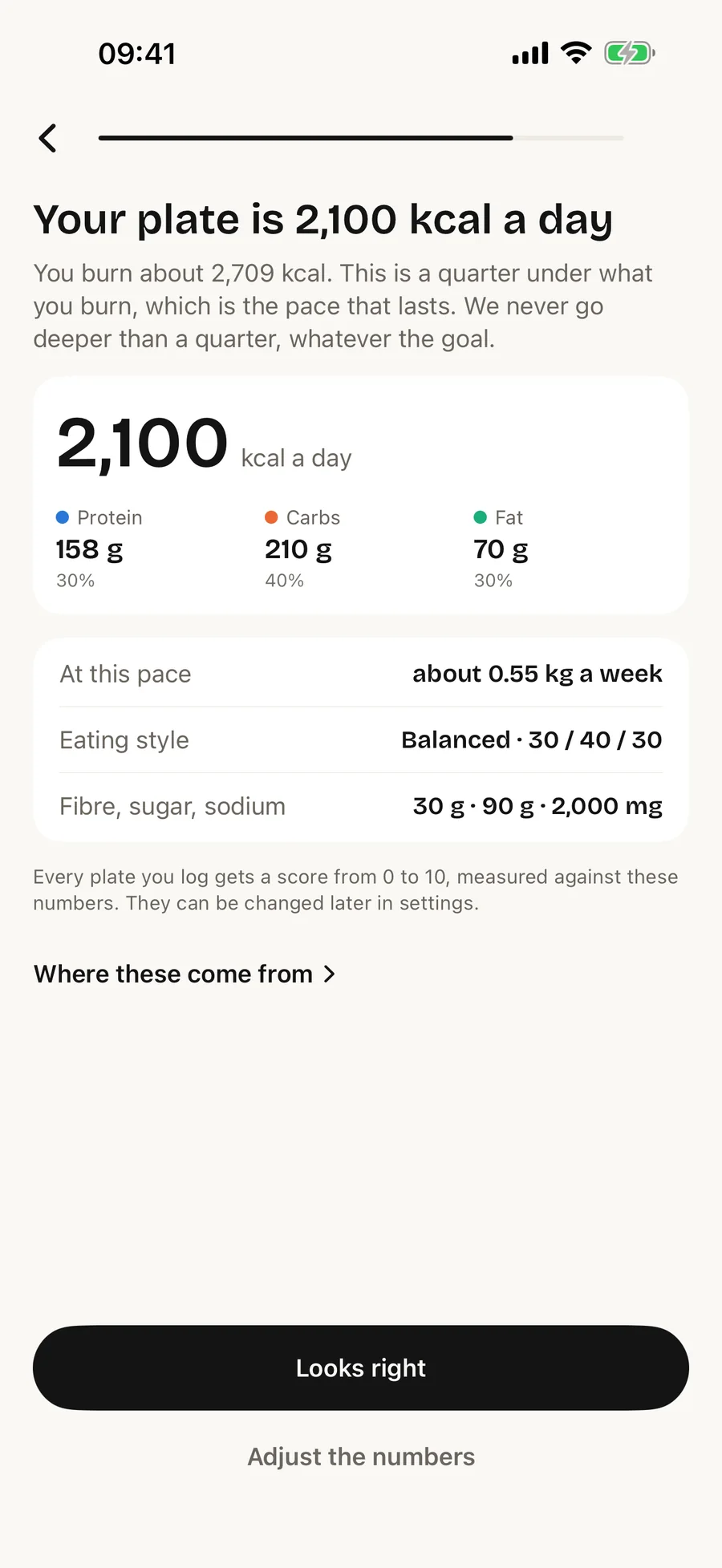
Your plate
Sized for you, and never too small.
Your plate comes from your body and your days: the Mifflin–St Jeor equation, how much you move, and the pace you choose. Two rules hold whatever the goal. The plate never goes deeper than a quarter under what you burn, and the pace never exceeds what your body allows: half a kilogram a week for most people, up to one only at a higher BMI.
Tap “Where these come from” and the maths is shown on your own numbers, with the sources: Mifflin 1990, NICE, the CDC, SACN, the EU and the WHO. Nothing is a secret formula.
On the phone
Built into iPhone, not bolted on.
The parts of iOS that get you to a plate faster than the app icon does, and out again.
Action button, Control Center, Lock Screen
“Log a plate” opens the camera straight to the plate. No tab bar, no tray, no unlock-and-find-the-icon.
Siri and Shortcuts
“What’s my day score in CheckCal?” “How many calories are left?” Answered out loud, without opening the app, from the data on your phone.
Ink on paper by day. Paper on ink at night.
The whole app follows the system appearance, and the score stays yellow in both.
Widgets
The ring and what is left, on the Home Screen and the Lock Screen, with a button that logs a plate from there.
Live Activity
While a plate is being read, the Dynamic Island shows the reading, then the score. Photos taken offline wait for a connection and are read when it returns.
Apple Health
Steps, workouts and weigh-ins come in; a weigh-in you type goes back. Only with your permission, and food is never written to it.
Share a plate, or a streak
A card for Stories or a message: the photo, the score and the four numbers. Nothing on it that is not yours.
Price
One thing is paid, and it is the one thing that costs us money.
Every photograph is read by a vision model we pay for per picture. That is the whole reason there is a price at all.
Freeno account, no card
Everything a camera cannot do better than a label.
- Barcodes: EAN‑13, EAN‑8 and UPC‑E, straight off the packet
- Search the food database, or type a meal in by hand
- Your day, the six rings and the score of every meal
- Weight and its trend, workouts, water, Apple Health
- Your plate, sized from your own numbers
- A PDF food log for your dietitian, nutritionist or doctor
Used this way, nothing you log ever leaves the phone.
$24.99a year
$2.08 a month, billed once a year. Or $3.99 month by month.
- Read a plate from a photograph, up to 40 a day
- Read a nutrition label from a photograph
- Fix a reading in your own words
- Your diary synced to a new phone
Renews automatically until cancelled; cancel any time in your Apple account settings. Prices in US dollars; Apple sets the equivalent for your region. Fair‑use limits are in the terms.
Questions
The ones people ask before they download.
How accurate is it, really?
Good at naming the food, rough on the weight, and the weight is what decides the calories. That is why every reading is correctable in words and with − and + right on the card, and why a corrected plate is remembered as yours. Shoot from above with the whole plate in frame, and correct the one or two big items; the rest rarely moves the total much.
What does the score actually measure?
Protein, fibre, sugar and salt against what your day needs, scaled to the size of the plate. Sugar counts as free sugar — added, or from juice, honey and syrup — against a tenth of the plate's energy, the line the WHO draws; sugar in whole fruit, vegetables and plain milk is not held against it. Calories are not part of it; the ring shows those. It runs on your phone in our own code, so the same plate gets the same score whenever you look.
Do my photos leave the phone?
The meal photos do, to be read, and only once you have agreed to it in the app. They go to our server, which passes them to Google's AI model and keeps neither the picture nor the result; Google does not use them to train its models. You can turn it off any time under You › Privacy. The copy on your phone is the only one that lasts, and it goes when you delete the meal. The privacy policy has the specifics.
Do I need an account?
No. Everything works without one, reading photographs included — the subscription pays for that. Signing in keeps a copy of your diary so it follows you to a new phone: sign in with Apple, with Google, or with an email address. You can sign out, or delete the account and everything in it, from the app.
Does it work offline?
Everything except the reading of a photograph. A plate photographed without a connection is kept and read as soon as one returns; nothing is lost and nothing has to be re-shot.
How do I cancel?
In Settings on your iPhone: your name, then Subscriptions. Subscriptions are handled by Apple, so we cannot cancel or refund one for you. Refunds go through reportaproblem.apple.com.
iPad, Apple Watch?
CheckCal is made for iPhone. It installs on an iPad and runs there in a phone-shaped window, and there is no Watch app yet; we would rather say so than claim support we have not built.
Every plate, scored.
One photo. A score with the reason, and the week explained.
